Posts

Showing posts with the label technology

Winning Webinar

One might think my lack of webinar facilitation experience, five total, would limit the potential for profound insight…. but in truth, I think it’s my lack of experience that might be beneficial. I have no special technology degrees, no formal training in webinar facilitation. In other words, if I can do it, anyone can do it. Here are my Lessons Learned: Just do it – No substitute for experience. No amount of planning will completely remove those butterflies. Use Familiar Content – New content and a new format is a recipe for stress. Script it Out – I write out exactly what I am going to say. I put everything in the notes section of the PPT. Team up – Work with a moderator & meet with them ahead of time. Run through your presentation, ask for suggestions on how to embed interactive activities. Interact with your Audience – Every 10 to 15 minutes have an interactive activity.. Questioning – smiley faces, polling, chat box – response to questions. Somethin...

Relationships and Technology

We are rapidly moving forward with a vision to augment our face to face professional learning opportunities for teachers and administrators. The goal is to provide learning opportunities in multiple formats including podcasts, webinars, videoconferencing, multimedia videos, etc… Our staff has been receptive, but there is a reluctance, maybe it is a sense of loss. Hord & Hall indicate grief is often mistaken for resistance. Working alone at your computer to facilitate a webinar or podcast can seem sterile – no immediate feedback, no eye contact or body language to help you gauge audience reaction.  It has given me pause to think about the role of technology and whether or not it is taking away from relationship building which is essential to our role as educational consultants at a regional service agency. As I was contemplating, I received a few emails in response to a webinar I facilitated: Reactions from participants following webinar 3 “On a personal note, I must ...

Join Us

Life has been pretty exciting lately, hence my blogging absence. My husband and I, in our infinite wisdom, moved mid school year. Just all kinds of fun with our two children and both us working in education! In addition, I added just a few job responsibilities. I am fortunate to be working with the Strategic Literacy Initiative, part of WestEd, a regional research lab, to coordinate Pennsylvania’s effort with implementing Reading Apprenticeship, an instructional framework to address content area literacy. Part of my efforts include contributing to their blog. Check out my new post, Report from Winter Conference: Reading Apprenticeship for Students with a Range of Needs . In the post, I share suggestions and examples regarding overcoming the challenging literacy needs that students sometimes bring to the high school level. What do you think? Can these ideas work?

Wanted: Great Ideas

  Over the last few months I have posted research on boys and reading . Shared some ideas for engaging all students, but especially boys in reading. These ideas included podcasts and five big ideas of reading , leveraging technology as a means to active literacy with before, during and after reading strategies, and most recently digital book reports . Pennsylvania is fortunate to have PAIUnet, a private network that literally nearly all 500 school districts and IUs have access. It’s a safe network where students and teachers can collaborate, publish, share and interact. We currently have access to several services and products through Keystone Commons , Safari Montage , and VoiceThread . Note some of these services have a subscription fee, while others are at no charge. In thinking about promoting reading in boys, what other kinds of services and supports could we leverage in this private network for PA students and teachers? Some ideas already shared have been a digital...

Book Reports Go Digital

Kudos to Recorded Books for launching an innovative contest encouraging students to read. Their Digital Book Report Contest is promoting their new literature curriculum, Book Jams . According to the the Book Jam website a digital book report would look like this… “Have your students pick their favorite book or a book from your lesson plan and create a song, performance, or debate. Get creative and win! Use music, props, and costumes! But make sure that it covers the core standards. We’d love to see rap songs about grammar, interactive presentations highlighting setting and symbolism, plays about conflict starring Hester Prynne to Harry Potter, and whatever else you and your students dream up!” The contest is innovative and engaging. The entries are diverse and captivating. Students cleverly used pictures, audio, music, original music, costumes, props and much more…. Finalist are now posted. Be amazed! Visit the Contest site , create an account and give these kids the feedb...

Before, During and After….

Image
We did an exciting program this summer in looking at the nexus of boys, reading pedagogy and the role of technology. The basic premise is if some students prefer more action based literacy activities, could technology fill that role? We came up with technology tools that could be used as Before, During and After reading strategies. All participants read the book, Diary of a Wimpy Kid, by Jeff Kinney as the back drop of looking at how reading pedagogy could be enhanced by technology tools. Before During After (focus retelling) Multi media text sets Blog Digital story telling   Wallwisher Movie Maker   Voicethread     Wordle     Glogster     Flip Note Studio   Teachers then embedded these technology to...

Hole in the Wall

Must watch video that looks at engagement, motivation and student learning. Presuming student capability. Click here to open up the video. Thanks to Michelle D. for sharing this. What do you think?

Mobile App for Walkthroughs

Image
I am totally enamored with Teachscape’s new mobile app for conducting instructional walkthroughs. The standard walkthrough tool allows you to collect data on a variety of curriculum and instruction items based on educational research. You can also create/customize your own walkthrough survey. The best part is the data can be collected with a simple touch using an iPhone/iTouch! Walkthroughs can be immediately uploaded with an internet signal or held in limbo until you have one. Perfect for schools without complete wireless coverage. Reports including charts and graphs can be created from the companion website. One touch data collection with a full compliment of data tools… smart tools for a busy administrator! Say good-bye to paper copies! No more clipboards! No more laptops to lug around!

Technology and the Savvy Shopper

Image
I love a good bargain. I drag myself out of bed the wee hours of the morning on Black Friday to get the best deals. This year I branched out to Cyber Monday, the Monday following Black Friday. As I was shopping online, I had an epiphany regarding web 2.0 tools and teachers. Most of the websites I was shopping on Amazon and Sam’s Club to name a few had options for their deals of the day and sale information to come through Twitter. No going from website to website to find the deals. Twitter did the work for me aggregating all sales information in one convenient place. I think this offers a lot of potential for engaging teachers in the power of web 2.0. If teachers can see a personal use for these tools, they are more likely to use these for professional development and consider how they might be used with students. Too often in-service time is spent on pushing buttons for a pay off that is too abstract for someone that has not really tried a web 2.0 tool. Let’s focus on som...

Making Learning Irresistible

  Dr. Tim Tyson , former principal of Mabry Middle School in Cobb County Georgia, led his staff on a quest to Make learning irresistible. A quick look at the former website convinces me they were on their way of achieving their their goal with a web presence that is virtually unmatched. It’s not that Mabry had a great website, but that they effectively used their website to further their mission and vision!   We talk about sharing examples of high quality student work. Their website showcases exemplary student work. Check out their Film Festival to see examples of student work or go to Podcast Central and see/hear about the successes of their students. We talk about partnering with parents. Staff blogs share homework and classroom happenings. The parent section has its own blog filled with relevant information concerning everything from student council minutes to immunization shots and year book sales. A portal for grades, attendance and discipline was also...

Purpose of Education

Image
Below is an excerpt I wrote for a college class. As a follow up, I need feedback from all of YOU to demonstrate the power of blogging! Please react to my post and comment on the purpose of education from your point of view.     Martin Luther King (1947) once said that education has two functions: utility and culture. He goes on to say that “It is intelligence plus character” that is the true purpose of education. I believe that dual purpose is still relevant today. We live in an increasingly complex, global society. Education must prepare students with the skills to live, work and thrive in this environment. This includes subject matter knowledge, but equally important will be skills such as communication, problem-solving, collaboration, information literacy, and character. Education must prepare students to be life-long learners in the truest sense of the term. Fewer and fewer unskilled labor jobs will exist. The future will depend on the ability of all individuals...

Growing Up Digital

I have been reading (on my Kindle) Don Tapscott’s (2009) Grown Up Digital: How the Next Generation Is Changing Your World . Tapscott urges educators to move from “broadcast learning to interactive learning.” Here’s a quote I liked summarizing his rationale: “Teachers are not a fountain of knowledge, the internet is.” What does curriculum and instruction look like in a classroom where most knowledge level questions can be answered with a simple Google search? 

Meeting the Needs of Diverse Learners

Image
All the school districts in my region and many others across Pennsylvania have access to Discovery Education , probably best known for streaming video. When I searched for streaming videos 116,458 results came up which can be further refined by grade level, subject area, type of media etc... Folks most often think of video clips or even full length videos and they would be right…. but there is much, much more. Discovery also has: Songs (466) – Multiplication raps, ABCs, Homophone Blues, Tornados & Hurricanes to name a few… Audio files (48) – speeches, historical events, and more Images (20,828) – historical events, historical figures, places, animals etc.. Writing prompts (603) – still pictures combined with a writing prompts historical people/events, careers & a large number for literary analysis. Prompts can be copied and/or edited to customize for teacher needs. Clip art (1184) –Most of the collection is for the elementary grades Sound effects (3...

Making Blogging a Breeze

Image
Windows Live Writer is an awesome  tool for blogging! I use Live Writer to create all my blog posts. It provides more features and flexibility to make my blog more attractive and efficient. I can work on drafts without an internet connection, preview the post to see how it will look on the live blog, and I can even set the date for the blog to automatically publish. It’s a free download that is compatible with the major blog services e.g. Blogger, TypePad, Wordpress and more….  My favorite feature is how easy it is to resize, align, and caption photos. Live Writer also allows you to add borders and effects to photos! Just insert a photo and a tool bar will appear as shown here. The default is inline, but a drop down box allows for you to set the picture to the Right or Left and wrap text. The next drop down box is Margins. The default is no margins, which often leads to your text running right up against the photo and ruining the appearance of the blog. Select Cust...

Livin on the Edge

Image
We ended our 36th annual Summer Administrative Workshop with Harvey Alston .  He wowed our audience with his energetic presentation. His stories and observations were often hilarious, but underneath was a very serious message. He advocated for the audience to look beyond circumstances, petty thoughts, negativity, personal agendas etc….to put students first! Mr. Alston took on many topics during is address, but I was surprised by his take on technology. His motto is…………. “If you are not livin on the edge, you’re taking up too much space!” Simply, our students live in a technologic world and we need to keep up if we are going to prepare them for that world. He believes that trying new things and engaging our staff to do the same is part of giving students our BEST! While I embrace Mr. Alston’s perspective I have to confess there are days when I think if I come any closer to the edge, I am going to fall off! It’s tough to try new things. It takes longer, feels awkward, and ...

My Personal Organizer

Image
              A colleague recently expressed interest in Twitter and other web 2.0 tools, but dismissed them because she didn't have time. I agreed. She did not have time to go to multiple websites and get the latest updates. I can't think of an administrator that does have time. iGoogle is a personalized web page and  is a one stop organizer for me.   It allows me to add news, photos, weather, and much more from across the web. At a glance I can check my personal email, which I use to access a lot of the web 2.0 tools, Twitter, and the various blogs I read through Google Reader. In other words, iGoogle does the work for me... pulling and organizing all the latest updates into one convenient location. For me the key is using Gmail for my personal email. When I check my email, I manage to check everything else too. How do you keep organized? Any recommendations for working/accessing information at a glance?

Eating Crow

Image
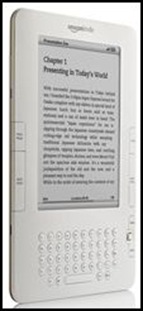
My husband gave me the Amazon Kindle 2 as an early birthday gift. All I can say is "WOW." The gift of all gifts for a bibliophile like me. I can't believe I once professed an aversion to electronic books.... I simply could not imagine giving up the look and feel of a paper book. Well  here I am, eating crow. 14 Reasons to love the Kindle: The screen has a paper-like quality. The screen has no back light - no glare. Holds up to 1500 books - Imagine carrying a whole library with you anytime you want Weighs just a few ounces Plays audio books and has text to speech features - if allowed by the publisher. Wireless downloads of new books in 60 seconds. I actually purchased a book while waiting at a stop light. Built in wireless connection is built in - similar to a cell phone - you do not need to provide it. Ability to add PDF documents. Bookmark your favorite pages. ...

More on the Four Day School Week

Image
Back in December I shared that Southern Columbia School District in Catawissa, PA intended to have a Four-Day School Week through January and February to save on heating and transportation costs. According to School Leader News the idea of a four-day school week is gaining momentum around the county . National Trends Select districts in about 17 states already have a four-day week with similar proposals being considered by the legislature in Florida, Georgia, Indiana, Maine, Missouri and Washington. The four-day school week was introduced in the 70's in response to the oil crisis and is now gaining fresh momentum in these troubling economic times. In order to meet state laws regarding instructional hours, most districts found they had to add just over one hour of instruction per day.   According to Associated Press (the source for this article) research indicates that districts save on transportation costs and can lead to increased attendance and teacher retention. In addi...

Technology as a Pre-requisite Skill?

We recently hired a new secretary. We required the all applicants to take the advanced assessment for Microsoft Office Excel, Word and Outlook. We do this because from experience we have learned that our office is too busy for people to learn on the job. They need to enter the job with a high degree of competency. We offer a personal interview only to the candidates that demonstrate they are tech savvy. This led me to pondering whether or not the same is true for new teachers. Is the classroom just too busy of a place to learn on the job? Should teachers enter the classroom with a high degree of technology competency. Should we assess technology skills in a systematic way in the same vein we look at pedagogy and communication skills? If the answer is no, how much further into the 21st century before we might consider technology assessment as a necessity? If the answer is yes, what technology skills would we assess and how would we assess them?